Showing posts with label E_text. Show all posts

FIFA 19 Menu For PES 6

cara merubah tampilan pes 6 ke fifa 19

FIFA 19 Menu For PES 6


PES6AREMA.COM - MrIMADE has worked hard to make the appearance of the Pro Evolution Soccer 6 game look like FIFA 19. He made the FIFA 19 menu for PES 6. Therefore, let us give credit and appreciation for his hard work.

Preview
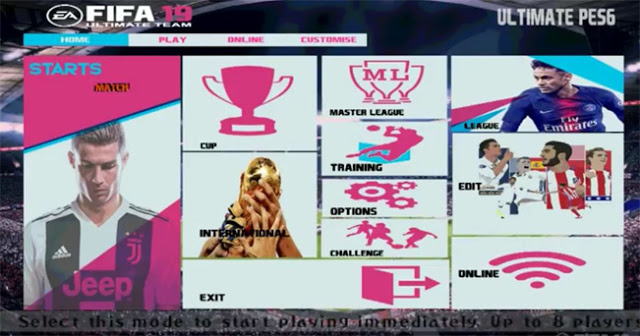


Download FIFA 19 Menu For PES 6 by MrIMADE

Mediafire

How to Install?

1. Copy 'e_text.afs' into C:\Program Files\Pro Evolution Soccer 6\Kitserver\Dat
2. Replace
3. Done!

Credit: MrIMADE PES 6 Graphics Maker

TAGS:

Change Menu PES 6
Update Menu FIFA 19 for PES 6
Cara Merubah Tampilan Menu PES 6 ke FIFA 19
Share:

PES 2019 Menu For PES 6

cara merubah tampilan pes 6 ke pes 2019

PES 2019 Menu For PES 6


PES6AREMA.COM - Ahmed R. Gineus has worked hard to make the appearance of the Pro Evolution Soccer 6 look like PES 2019. He made PES 2019 menu for PES 6. Therefore, let's give credit and appreciation for his hard work.

Preview

menu pes 2019 for pes 6

Download Menu PES 2019 For PES 6

Mediafire

How to Install?

Copy 0_text.afs and e_text.afs into C:\Program Files\Pro Evolution Soccer 6\Kitserver\Dat

Credit: Ahmed R. Gineus

TAGS:

Change Menu PES 6
Update Menu PES 2019 for PES 6
Cara Merubah Tampilan Menu PES 6 ke PES 2019
Share:

Update e_text PES 6 Liga 1 Non Patch

cara ganti tulisan other league pes 6

Update e_text PES 6 Liga 1 Non Patch


To complete the last PES 6 option file that I've shared, please download the following update e_text.afs file. This file was edited by gatsu87 and specifically for Pro Evolution Soccer 6 users without patches, so give thanks to him.

cara mengganti other league pes 6

What are the updates in this e_text file?


  • Change of Competition Logo
  • Change the name of the competition, for example: other league A becomes Liga1 Gojek
  • and many others

Download e_text pes 6 2018/2019

How to change e_text.afs file?


  • Extract file you have downloaded.
  • Copy or move e_text.afs file into C:\Program Files\KONAMI\Pro Evolution Soccer 6\dat
  • Replace
  • Done
Credit: GATSU87
Share:

Option File

Full Patch